How to Get Your Flight Ticket on Trip.com


My blog covers everything you need to know about flight tickets on Trip.com, including how to book cheap flights, get and print your flight e-ticket, and understand flight refund policies.👇👇👇
to Bangkok
to Manila
to Shanghai
to Tokyo
to Seoul
See all flights


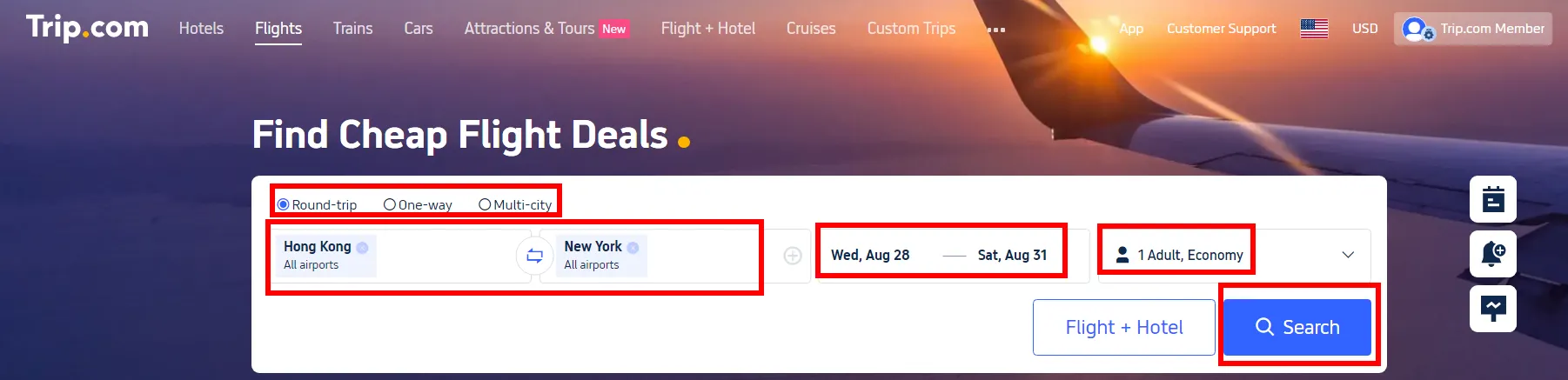
In order to get your flight ticket on Trip.com, you shall first book a flight on Trip.com. Check how to book the best & cheapest flight below🥳
- Visit the Website/App: Start by visiting the Trip.com Flight website or Trip.com mobile app.
- Search for Flights: Enter your departure and destination cities, travel dates, one way/round trip and business/economy class & the number of passengers. Click "Search" to view available options.
- Select Your Flight: Choose a flight that fits your schedule and budget. Use filters for price, duration, and airline preferences.
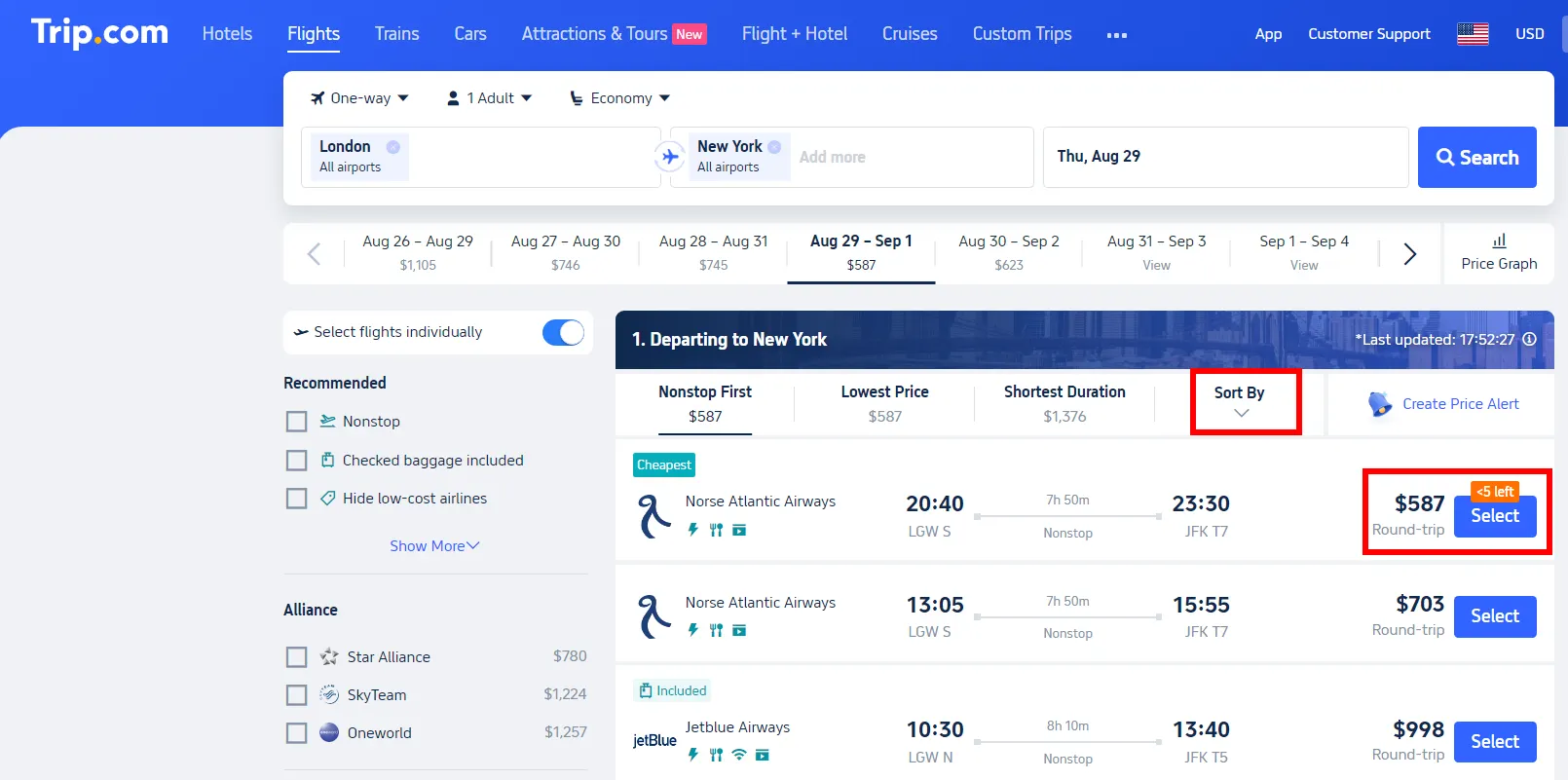
- Enter Passenger Details: Fill in the necessary details for all passengers. Ensure names match the IDs or passports.
- Payment: Review your selected flight details and proceed to payment. Choose your preferred payment method, and complete the purchase.
For tips on finding cheap tickets on Trip.com, check Trip.com Flight Deals Monthly Update & the guide below.
How to Get Flight E Ticket on Trip.com
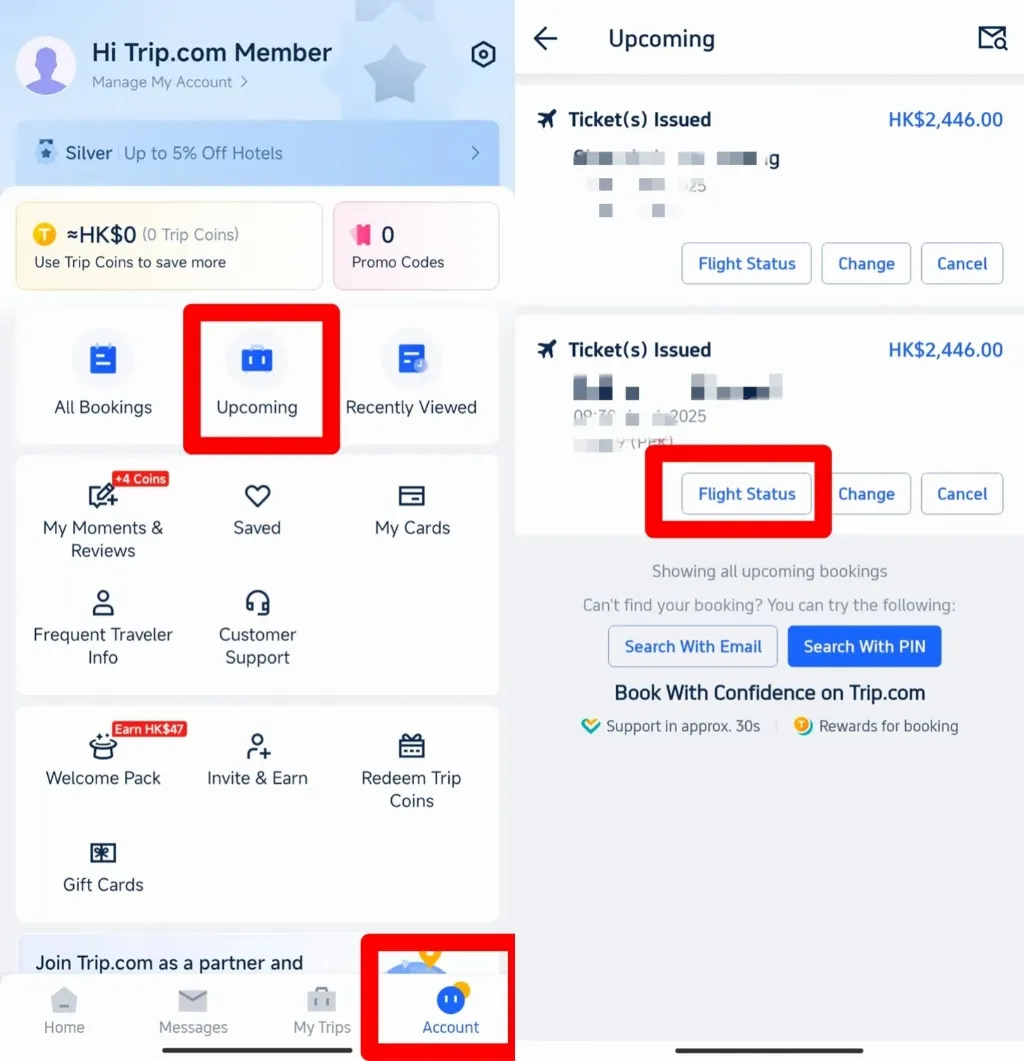
Step 1: Find Manage My Bookings
- Open the App: Start by opening the Trip.com app on your phone.
- Go to 'Account': At the bottom of the screen, tap on the "Account" tab.
- Look for 'Upcoming': On the "Account" page, scroll to the middle where it says "Upcoming."
- Tap 'Flight Status': On the flight page, you’ll see a "Flight Status" button. Tap it to go to your booking details.
- Find Manage My Booking: On your Flight Status page, you can see at the bottom,'Manage My Bookings', pls tap.
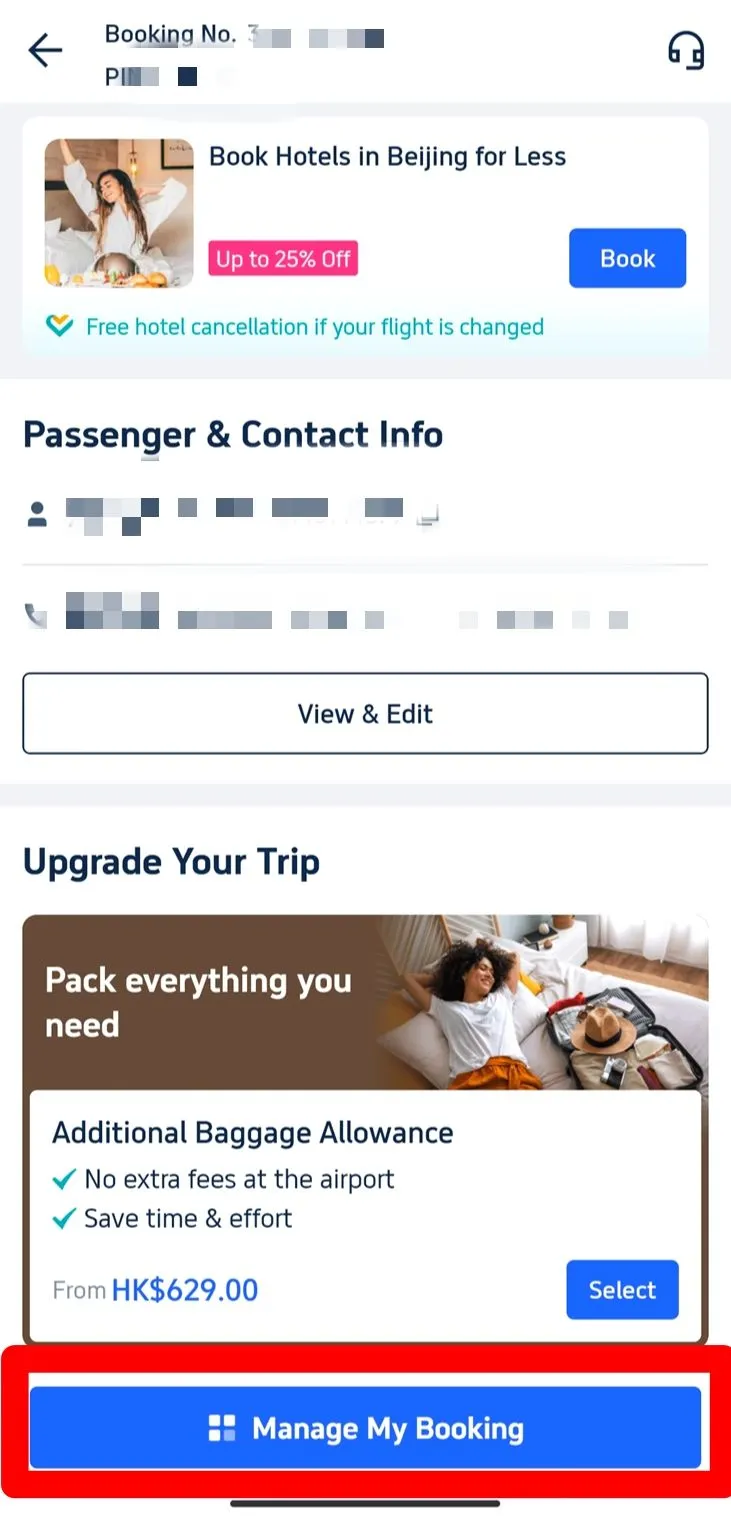
Step 2: Select E-Receipts
- Find the ‘Get a Receipt’ Button: Under the ‘More Options’ section, locate and click on the ‘Get a Receipt’ button.
- Choose Your E-Tickets: On the receipt page, you will see a list of your flight bookings. Select the e-tickets you need.
- Click ‘Continue’: After selecting the relevant e-tickets, click on the ‘Continue’ button to proceed.
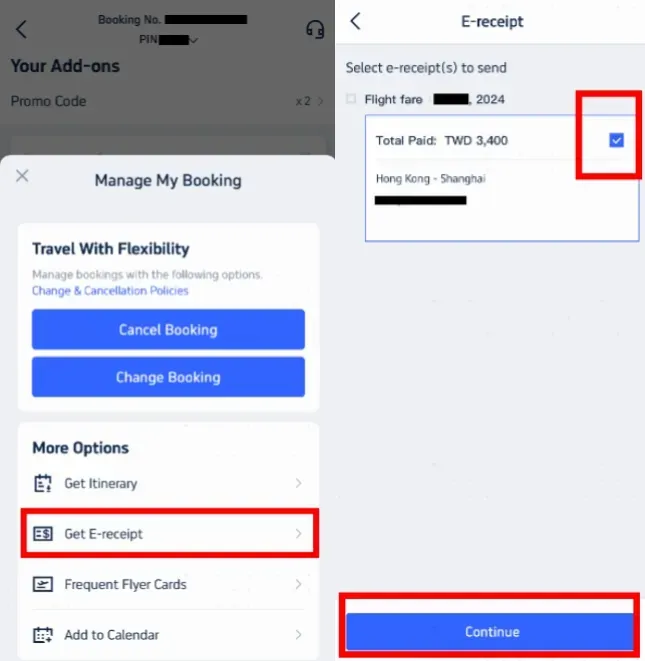
Step 3: Enter Details for Receipt
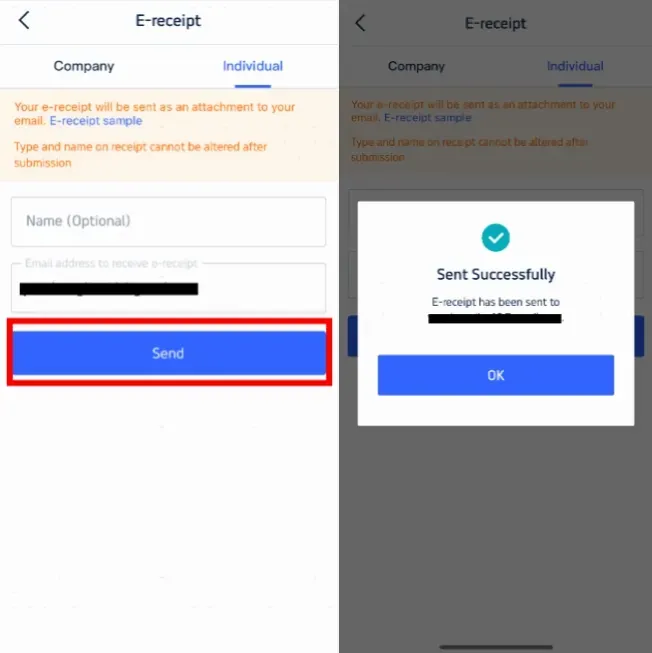
- Select Receipt Type: If you’re retrieving the e-ticket for personal use, choose ‘Individual.’
- Enter Your Details: Provide your name (this is optional) and the email address where you want the e-receipt sent.
- Important: The type and name on the receipt cannot be changed after submission.
- Click ‘Send’: Once all details are entered, click the ‘Send’ button.
- Confirmation Message: You’ll then receive a message confirming that the e-receipt has been successfully sent.
- Check Your Email: Click ‘OK,’ then check your email inbox later for the e-receipt. ( It may take some time to receive your e-receipt, because Airline need time to verify)
How to Print Your Flight E-Ticket on Trip.com
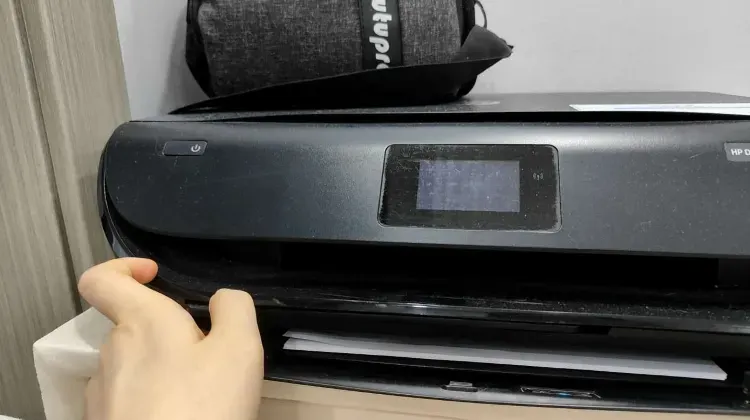
- Why Print?: For international flights, it is advisable to carry a printed copy of your e-ticket to present at various checkpoints, although for domestic flights, a digital copy is usually sufficient.
- Steps to Print:
- Open the email from Trip.com containing your e-ticket(refer to the former step).
- Download the attached e-ticket file to your device.
- Open the file on your device and print it using your printer.
Check-In and Using Your Flight Ticket
- Online Check-In: Use your PNR or booking reference number to check in online via the airline’s website or mobile app. This step often allows you to choose seats and download your boarding pass.
- Airport Check-In: Present your e-ticket (either digital or printed) along with your ID or passport at the check-in counter or self-service kiosks at the airport. You’ll receive a physical boarding pass if required.
- Boarding: At the gate, show your boarding pass and ID to board the flight. Ensure your e-ticket or printed ticket is handy in case it’s requested again.
Trip.com Flight Refund and Cancellation Policies
Trip.com cancellation policies vary based on the airline and ticket type. Refunds depend on the fare rules associated with your ticket. Some tickets may be non-refundable, while others might involve a cancellation fee.
- Steps to Cancel Booked Flights
- Go to “My Trips” in the Trip.com app or website.
- Find the flight booking you wish to cancel under "Manage My Booking."
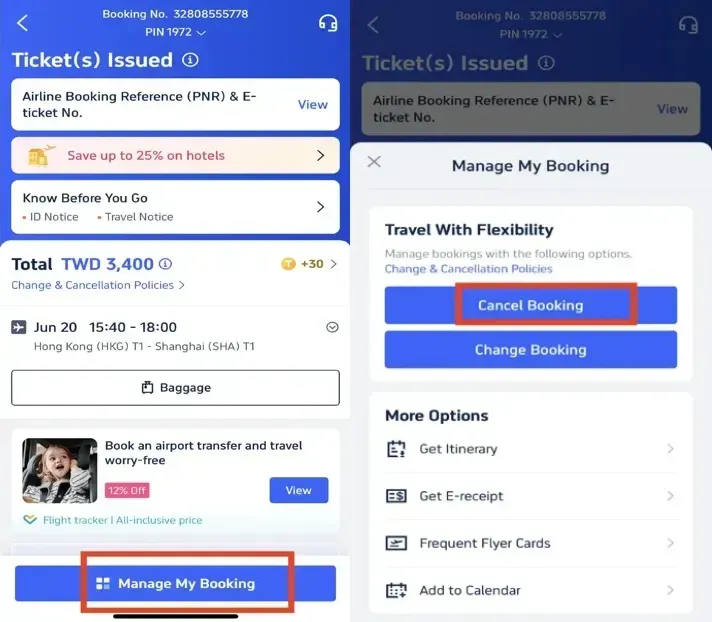
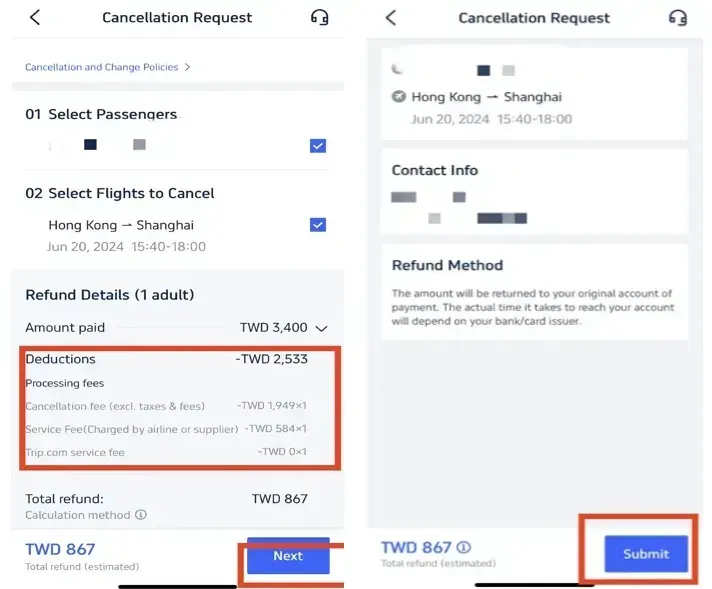
- Click “Cancel Booking” and follow the prompts to review the refund details and any applicable fees.
- Confirm and submit your cancellation request.
⚠️ Refund Disclaimer: Flight cancellation rules and fees are dictated solely by the operating airlines, not Trip.com. Refund processing times may vary significantly depending on airline policies and bank processing times, and may take up to several weeks to reflect in your account. Trip.com shall not be held liable for airline-imposed refund delays or non-refundable ticket restrictions.
Trip.com Flight Bookings and Membership Perks

Booking flights on Trip.com doesn’t just give you access to great flight deals; it opens up a world of rewards through Trip.com Membership. As you earn Trip Coins with every booking, you’ll also unlock exclusive perks as you level up through the membership tiers—from Silver to Diamond. Here’s a closer look at what each membership level offers:
Benefits & Trip Coins for 6 Member Tiers
Category | Perks & Services | Silver | Gold | Platinum | Diamond | Diamond+ | Black Diamond |
Perks | Earn Trip Coins | Standard Rate | Earn 20% More | Earn 50% More | Earn 100% More | Earn 150% More | Earn 200% More |
Free Airport VIP Lounge Access | - | - | 1 time | 2 times | 3 times | 12 times | |
Free Global eSIM Data Package | - | - | 1GB / 3 days (x1) | 3GB / 5 days (x1) | 3GB / 5 days (x2) | 3GB / 5 days (x8) | |
Airport Transfer Model Upgrade | - | - | - | 2 times | 4 times | 8 times | |
No Admin Fee for Train Refunds | - | - | - | 2 times | 4 times | 8 times | |
Free Attraction Ticket | - | - | - | - | 1 ticket | 1 ticket | |
Services | Flight-Hotel Cancellation Guarantee | ✓ | ✓ | ✓ | ✓ | ✓ | ✓ |
Priority One-stop Support | - | - | - | - | ✓ | ✓ | |
Dedicated Relations Management Team | - | - | - | - | - | ✓ |
See all attractions
 1662 booked






🔥[Discount] Global Hotel Recommendations
Search Top Global Hotels
See All Hotels







Disclaimer: This article has been provided by an individual contributor or third party platform. If there is any discrepancy regarding the copyright, please contact us directly and we will delete the content immediately.
Trending Searches
-
Air Travel Guide
-
Latest Flight Deals
-
Popular Flight & Hotel Packages
-
Getting Around
-
eSIM/SIM card
- Medellin Vacation Packages
- Hong Kong Vacation Packages
- Tokyo Flight and Hotel
- Langkawi Flight and Hotel
- Seoul Flight and Hotel
- Cascais Vacation Packages
- Kuala Lumpur Flight and Hotel
- Manila Vacation Packages
- Palma de Mallorca Vacation Packages
- New Orleans Vacation Packages
- Tehran Vacation Packages
- Lahore Vacation Packages
- Antwerp Vacation Packages
- Cuenca Vacation Packages
- Helsinki Vacation Packages
- Lijiang Airport
- Chitose Airport to Sapporo
- Qingdao Metro Travel Guide
- Beijing Airport to City
- Xiamen Metro
- JR Pass
- Macau Taxi
- Guangzhou Airport to City
- Xian Metro Map
- Shanghai Hongqiao International Airport
- KL MRT Map
- Xiamen Airport
- Beijing Metro Map
- Wenzhou Metro
- Narita Airport to Shinjuku
- Macau to Hong Kong
- Osaka Station to Kyoto Station